> ## Documentation Index
> Fetch the complete documentation index at: https://mintlify.com/minekube/gate/llms.txt
> Use this file to discover all available pages before exploring further.
# Bedrock Crossplay
> Enable cross-platform play between Java and Bedrock Edition players using Gate's built-in Geyser integration
# Bedrock Crossplay
Enable seamless cross-play between Minecraft Java and Bedrock Edition players on your server network with **zero backend plugins required**. Gate provides built-in Geyser integration that handles all Bedrock protocol translation automatically.
## Overview
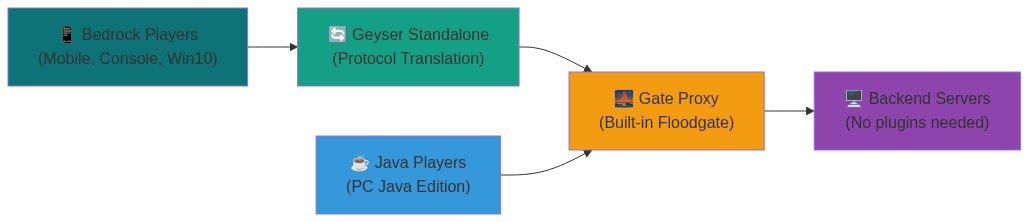
Gate's Bedrock support uses a proxy-in-front-of-proxy architecture with built-in Floodgate protocol support:
 ### How It Works
1. **Bedrock Players** connect to Geyser on UDP port 19132 (customizable)
2. **Geyser** translates Bedrock protocol to Java Edition and forwards to Gate
3. **Gate** handles Floodgate authentication internally and routes connections
4. **Backend servers** see all players as normal Java Edition connections
### Key Benefits
* **No backend plugins** - Gate handles all Bedrock logic internally
* **Zero configuration** - Managed mode handles everything automatically
* **Cross-platform** - Supports all Bedrock platforms (mobile, console, Windows)
* **Secure** - Uses AES-128 encryption for player authentication
## Quick Start
Get Bedrock support running in 30 seconds with managed mode:
Add the following to your `config.yml`:
```yaml theme={null}
config:
bind: 0.0.0.0:25565
onlineMode: true
servers:
server1: localhost:25566
try:
- server1
# Enable Bedrock support - that's it!
bedrock:
managed: true
```
Launch Gate with your configuration:
```bash theme={null}
gate --config config.yml
```
Gate automatically:
* Generates encryption keys
* Downloads Geyser
* Creates optimized configs
* Manages the Geyser process
Players can now connect:
* **Java Players**: `localhost:25565`
* **Bedrock Players**: `localhost:19132`
The `managed: true` shorthand enables both Bedrock support and managed mode in one line!
## Configuration
### Basic Configuration
For most users, managed mode provides the perfect balance of simplicity and control:
```yaml Minimal Setup theme={null}
bedrock:
managed: true
```
```yaml With Customization theme={null}
bedrock:
# Custom username format to avoid conflicts
usernameFormat: '.%s' # .Steve instead of Steve
# Custom listen address for Geyser connections
geyserListenAddr: 'localhost:25567'
# Custom key path (optional - auto-generated if not specified)
floodgateKeyPath: '/path/to/key.pem'
managed:
enabled: true
autoUpdate: true # Keep Geyser up-to-date automatically
```
### Configuration Options
| Option | Description | Default |
| ------------------ | ----------------------------------------------------------- | ----------------- |
| `usernameFormat` | Format string for Bedrock usernames (use `%s` for username) | `".%s"` |
| `geyserListenAddr` | Address where Gate listens for Geyser connections | `localhost:25567` |
| `floodgateKeyPath` | Path to Floodgate encryption key | `floodgate.pem` |
### Managed Mode Options
| Option | Description | Default |
| ------------ | ---------------------------------- | --------- |
| `enabled` | Enable automatic Geyser management | `false` |
| `autoUpdate` | Automatically update Geyser JAR | `true` |
| `javaPath` | Path to Java executable | `java` |
| `dataDir` | Directory for Geyser files | `.geyser` |
| `extraArgs` | Additional JVM arguments | `[]` |
### Network Configuration
**Default `localhost:25567`** works for most setups where Geyser runs on the same machine.
**Use `0.0.0.0:25567` for:**
* Docker Compose with separate containers
* Remote Geyser on different server
* Kubernetes pod-to-pod communication
## Advanced Configuration
### Custom Geyser Settings
Override any Geyser configuration option using `configOverrides`:
```yaml Performance Tuning theme={null}
bedrock:
managed:
enabled: true
configOverrides:
# Optimize for performance
bedrock:
port: 19132
compression-level: 8
mtu: 1200
use-direct-connection: true
max-players: 500
```
```yaml Custom Branding theme={null}
bedrock:
managed:
enabled: true
configOverrides:
# Customize server branding
bedrock:
motd1: 'My Amazing Server'
motd2: 'Cross-Play Enabled!'
server-name: 'MyServer Bedrock'
xbox-achievements-enabled: true
```
```yaml Custom Port theme={null}
bedrock:
managed: true
configOverrides:
# Use a different Bedrock port
bedrock:
port: 25565 # Use same port as Java (if on different IPs)
```
### Username Formatting
Prevent conflicts between Java and Bedrock usernames:
```yaml Prefix with Dot theme={null}
bedrock:
managed: true
usernameFormat: '.%s' # Steve becomes .Steve
```
```yaml Suffix with Platform theme={null}
bedrock:
managed: true
usernameFormat: '%s_BE' # Steve becomes Steve_BE
```
```yaml Custom Format theme={null}
bedrock:
managed: true
usernameFormat: 'Mobile_%s' # Steve becomes Mobile_Steve
```
## Manual Setup (Advanced)
For users who want to manage their own Geyser installation:
Create a 16-byte AES-128 key:
```bash theme={null}
openssl rand -out key.pem 16
chmod 600 key.pem
```
```bash theme={null}
wget https://download.geysermc.org/v2/projects/geyser/versions/latest/builds/latest/downloads/standalone -O geyser-standalone.jar
```
```yaml theme={null}
bedrock:
enabled: true
geyserListenAddr: 'localhost:25567'
usernameFormat: '.%s'
floodgateKeyPath: '/path/to/key.pem'
```
Edit Geyser's `config.yml`:
```yaml theme={null}
bedrock:
port: 19132
address: 0.0.0.0
remote:
address: localhost
port: 25567
auth-type: floodgate
use-proxy-protocol: true
floodgate-key-file: /path/to/key.pem
```
```bash theme={null}
# 1. Start Gate first
gate --config config.yml
# 2. Start your backend servers
# 3. Start Geyser Standalone
java -Xmx1G -jar geyser-standalone.jar
```
Manual setup requires careful coordination of configurations, startup order, and key management. **Managed mode is recommended** for most users.
## Troubleshooting
**Solutions:**
1. Check UDP port - Ensure port 19132 is open for UDP traffic:
```bash theme={null}
nc -u -l 19132 # On server
nc -u server-ip 19132 # From client
```
2. Verify managed mode status - Check Gate logs for Geyser startup:
```log theme={null}
INFO bedrock.managed geyser standalone process started pid=1234
INFO [GEYSER] Done (5.2s)! Run /geyser help for help!
```
3. Check firewall - Allow UDP 19132 and TCP 25567:
```bash theme={null}
sudo ufw allow 19132/udp # Bedrock clients
sudo ufw allow 25567/tcp # Geyser to Gate
```
**Solutions:**
1. Verify key generation - Check if Floodgate key was created:
```bash theme={null}
ls -la floodgate.pem
# Should show: -rw------- (0600 permissions)
```
2. Check key permissions:
```bash theme={null}
chmod 600 floodgate.pem
chown gate:gate floodgate.pem
```
3. Regenerate if corrupted:
```bash theme={null}
rm floodgate.pem
gate --config config.yml # Auto-generates new key
```
**Solutions:**
1. Tune Geyser settings:
```yaml theme={null}
bedrock:
managed:
enabled: true
configOverrides:
bedrock:
compression-level: 8
mtu: 1200
use-direct-connection: true
```
2. Increase memory for Geyser:
```yaml theme={null}
bedrock:
managed:
enabled: true
extraArgs: ['-Xmx2G', '-XX:+UseG1GC']
```
## Supported Features
### Fully Supported
* **Cross-platform play** - All Bedrock devices can join Java servers
* **Authentication** - Secure Xbox Live authentication via Floodgate
* **Chat & commands** - Full compatibility between editions
* **World interaction** - Building, mining, crafting work normally
* **Device detection** - Server can identify player platforms
* **Inventory sync** - Items transfer correctly between editions
### Partial Support
* **Custom items** - Java-specific items may render differently
* **Resource packs** - Bedrock packs need special conversion
* **Some plugins** - Java-specific plugins may not work with Bedrock players
### Not Supported
* **Bedrock-exclusive features** - Education Edition content, some UI elements
* **Java mods** - Forge/Fabric mods don't work with Bedrock clients
* **Complex redstone** - Some advanced redstone may behave differently
* **Lite Mode** - Gate Lite isn't compatible with Bedrock Edition (coming soon)
For more information about Geyser and Floodgate, visit the [GeyserMC Wiki](https://wiki.geysermc.org/).
### How It Works
1. **Bedrock Players** connect to Geyser on UDP port 19132 (customizable)
2. **Geyser** translates Bedrock protocol to Java Edition and forwards to Gate
3. **Gate** handles Floodgate authentication internally and routes connections
4. **Backend servers** see all players as normal Java Edition connections
### Key Benefits
* **No backend plugins** - Gate handles all Bedrock logic internally
* **Zero configuration** - Managed mode handles everything automatically
* **Cross-platform** - Supports all Bedrock platforms (mobile, console, Windows)
* **Secure** - Uses AES-128 encryption for player authentication
## Quick Start
Get Bedrock support running in 30 seconds with managed mode:
Add the following to your `config.yml`:
```yaml theme={null}
config:
bind: 0.0.0.0:25565
onlineMode: true
servers:
server1: localhost:25566
try:
- server1
# Enable Bedrock support - that's it!
bedrock:
managed: true
```
Launch Gate with your configuration:
```bash theme={null}
gate --config config.yml
```
Gate automatically:
* Generates encryption keys
* Downloads Geyser
* Creates optimized configs
* Manages the Geyser process
Players can now connect:
* **Java Players**: `localhost:25565`
* **Bedrock Players**: `localhost:19132`
The `managed: true` shorthand enables both Bedrock support and managed mode in one line!
## Configuration
### Basic Configuration
For most users, managed mode provides the perfect balance of simplicity and control:
```yaml Minimal Setup theme={null}
bedrock:
managed: true
```
```yaml With Customization theme={null}
bedrock:
# Custom username format to avoid conflicts
usernameFormat: '.%s' # .Steve instead of Steve
# Custom listen address for Geyser connections
geyserListenAddr: 'localhost:25567'
# Custom key path (optional - auto-generated if not specified)
floodgateKeyPath: '/path/to/key.pem'
managed:
enabled: true
autoUpdate: true # Keep Geyser up-to-date automatically
```
### Configuration Options
| Option | Description | Default |
| ------------------ | ----------------------------------------------------------- | ----------------- |
| `usernameFormat` | Format string for Bedrock usernames (use `%s` for username) | `".%s"` |
| `geyserListenAddr` | Address where Gate listens for Geyser connections | `localhost:25567` |
| `floodgateKeyPath` | Path to Floodgate encryption key | `floodgate.pem` |
### Managed Mode Options
| Option | Description | Default |
| ------------ | ---------------------------------- | --------- |
| `enabled` | Enable automatic Geyser management | `false` |
| `autoUpdate` | Automatically update Geyser JAR | `true` |
| `javaPath` | Path to Java executable | `java` |
| `dataDir` | Directory for Geyser files | `.geyser` |
| `extraArgs` | Additional JVM arguments | `[]` |
### Network Configuration
**Default `localhost:25567`** works for most setups where Geyser runs on the same machine.
**Use `0.0.0.0:25567` for:**
* Docker Compose with separate containers
* Remote Geyser on different server
* Kubernetes pod-to-pod communication
## Advanced Configuration
### Custom Geyser Settings
Override any Geyser configuration option using `configOverrides`:
```yaml Performance Tuning theme={null}
bedrock:
managed:
enabled: true
configOverrides:
# Optimize for performance
bedrock:
port: 19132
compression-level: 8
mtu: 1200
use-direct-connection: true
max-players: 500
```
```yaml Custom Branding theme={null}
bedrock:
managed:
enabled: true
configOverrides:
# Customize server branding
bedrock:
motd1: 'My Amazing Server'
motd2: 'Cross-Play Enabled!'
server-name: 'MyServer Bedrock'
xbox-achievements-enabled: true
```
```yaml Custom Port theme={null}
bedrock:
managed: true
configOverrides:
# Use a different Bedrock port
bedrock:
port: 25565 # Use same port as Java (if on different IPs)
```
### Username Formatting
Prevent conflicts between Java and Bedrock usernames:
```yaml Prefix with Dot theme={null}
bedrock:
managed: true
usernameFormat: '.%s' # Steve becomes .Steve
```
```yaml Suffix with Platform theme={null}
bedrock:
managed: true
usernameFormat: '%s_BE' # Steve becomes Steve_BE
```
```yaml Custom Format theme={null}
bedrock:
managed: true
usernameFormat: 'Mobile_%s' # Steve becomes Mobile_Steve
```
## Manual Setup (Advanced)
For users who want to manage their own Geyser installation:
Create a 16-byte AES-128 key:
```bash theme={null}
openssl rand -out key.pem 16
chmod 600 key.pem
```
```bash theme={null}
wget https://download.geysermc.org/v2/projects/geyser/versions/latest/builds/latest/downloads/standalone -O geyser-standalone.jar
```
```yaml theme={null}
bedrock:
enabled: true
geyserListenAddr: 'localhost:25567'
usernameFormat: '.%s'
floodgateKeyPath: '/path/to/key.pem'
```
Edit Geyser's `config.yml`:
```yaml theme={null}
bedrock:
port: 19132
address: 0.0.0.0
remote:
address: localhost
port: 25567
auth-type: floodgate
use-proxy-protocol: true
floodgate-key-file: /path/to/key.pem
```
```bash theme={null}
# 1. Start Gate first
gate --config config.yml
# 2. Start your backend servers
# 3. Start Geyser Standalone
java -Xmx1G -jar geyser-standalone.jar
```
Manual setup requires careful coordination of configurations, startup order, and key management. **Managed mode is recommended** for most users.
## Troubleshooting
**Solutions:**
1. Check UDP port - Ensure port 19132 is open for UDP traffic:
```bash theme={null}
nc -u -l 19132 # On server
nc -u server-ip 19132 # From client
```
2. Verify managed mode status - Check Gate logs for Geyser startup:
```log theme={null}
INFO bedrock.managed geyser standalone process started pid=1234
INFO [GEYSER] Done (5.2s)! Run /geyser help for help!
```
3. Check firewall - Allow UDP 19132 and TCP 25567:
```bash theme={null}
sudo ufw allow 19132/udp # Bedrock clients
sudo ufw allow 25567/tcp # Geyser to Gate
```
**Solutions:**
1. Verify key generation - Check if Floodgate key was created:
```bash theme={null}
ls -la floodgate.pem
# Should show: -rw------- (0600 permissions)
```
2. Check key permissions:
```bash theme={null}
chmod 600 floodgate.pem
chown gate:gate floodgate.pem
```
3. Regenerate if corrupted:
```bash theme={null}
rm floodgate.pem
gate --config config.yml # Auto-generates new key
```
**Solutions:**
1. Tune Geyser settings:
```yaml theme={null}
bedrock:
managed:
enabled: true
configOverrides:
bedrock:
compression-level: 8
mtu: 1200
use-direct-connection: true
```
2. Increase memory for Geyser:
```yaml theme={null}
bedrock:
managed:
enabled: true
extraArgs: ['-Xmx2G', '-XX:+UseG1GC']
```
## Supported Features
### Fully Supported
* **Cross-platform play** - All Bedrock devices can join Java servers
* **Authentication** - Secure Xbox Live authentication via Floodgate
* **Chat & commands** - Full compatibility between editions
* **World interaction** - Building, mining, crafting work normally
* **Device detection** - Server can identify player platforms
* **Inventory sync** - Items transfer correctly between editions
### Partial Support
* **Custom items** - Java-specific items may render differently
* **Resource packs** - Bedrock packs need special conversion
* **Some plugins** - Java-specific plugins may not work with Bedrock players
### Not Supported
* **Bedrock-exclusive features** - Education Edition content, some UI elements
* **Java mods** - Forge/Fabric mods don't work with Bedrock clients
* **Complex redstone** - Some advanced redstone may behave differently
* **Lite Mode** - Gate Lite isn't compatible with Bedrock Edition (coming soon)
For more information about Geyser and Floodgate, visit the [GeyserMC Wiki](https://wiki.geysermc.org/).